We use cookies to ensure you get the best experience on our website. By continuing
to use our site, you accept our use of cookies, privacy policy and terms of service.
ESC
What are you looking for?
Subscribe to our Newsletter
Join 10k+ people to get notified about new posts, news and updates.
Terms of use dolor sit amet consectetur, adipisicing elit. Recusandae provident ullam
aperiam quo ad non corrupti sit vel quam repellat ipsa quod sed, repellendus
adipisci, ducimus ea modi odio assumenda.
Disclaimers
Lorem ipsum dolor sit amet consectetur adipisicing elit. Sequi, cum esse possimus
officiis amet ea voluptatibus libero! Dolorum assumenda esse, deserunt ipsum ad
iusto! Praesentium error nobis tenetur at, quis nostrum facere excepturi architecto
totam.
Lorem ipsum dolor sit amet consectetur adipisicing elit. Inventore, soluta alias
eaque modi ipsum sint iusto fugiat vero velit rerum.
Limitation on Liability
Sequi, cum esse possimus officiis amet ea voluptatibus libero! Dolorum assumenda
esse, deserunt ipsum ad iusto! Praesentium error nobis tenetur at, quis nostrum
facere excepturi architecto totam.
Lorem ipsum dolor sit amet consectetur adipisicing elit. Inventore, soluta alias
eaque modi ipsum sint iusto fugiat vero velit rerum.
Copyright Policy
Dolor sit amet consectetur adipisicing elit. Sequi, cum esse possimus officiis amet
ea voluptatibus libero! Dolorum assumenda esse, deserunt ipsum ad iusto! Praesentium
error nobis tenetur at, quis nostrum facere excepturi architecto totam.
Lorem ipsum dolor sit amet consectetur adipisicing elit. Inventore, soluta alias
eaque modi ipsum sint iusto fugiat vero velit rerum.
General
Sit amet consectetur adipisicing elit. Sequi, cum esse possimus officiis amet ea
voluptatibus libero! Dolorum assumenda esse, deserunt ipsum ad iusto! Praesentium
error nobis tenetur at, quis nostrum facere excepturi architecto totam.
Lorem ipsum dolor sit amet consectetur adipisicing elit. Inventore, soluta alias
eaque modi ipsum sint iusto fugiat vero velit rerum.
LinkedIn ABM Impression Capping to Avoid Budget Wastage
Stop Wasting Budget on the Same Accounts
TLDR:
Most LinkedIn ABM campaigns waste budget by hitting the same accounts repeatedly. Here's what typically happens: 70% of your spend goes to just 10-15% of your target list - the accounts that engage most. Meanwhile, your strategic accounts that don't click as often get little to no exposure.
LinkedIn's native frequency capping doesn't fix this. It limits how often individuals see ads, but it can't stop one company from eating your entire budget. That's where account-level impression capping comes in. It controls spending per company using firmographic rules like industry, revenue, employee count, and location. Instead of letting algorithms decide where your money goes, you decide which accounts matter.
The difference is dramatic: 80-90% of your target accounts actually see your ads, compared to just 15-25% without capping.
Why LinkedIn Wastes Your ABM Budget
You've built a perfect target account list of 500 companies. You've created personalized ads. You're targeting the right job titles and industries. Yet after 30 days and $15,000 spent, only 73 of your 500 accounts actually saw your ads.
The other 427 accounts? They got fewer than 3 impressions each. Many got zero.
Meanwhile, one enterprise account with 8,000 employees consumed 22% of your monthly budget. Another 50 highly engaged companies ate through 60% of your total spend.
This isn't a targeting problem. It's how LinkedIn's algorithm works.
LinkedIn is a social media platform, and its algorithm optimizes for engagement metrics - clicks, conversions, and interaction rates. The platform's machine learning identifies which users and companies respond most, then concentrates budget on those high-performers. For broad awareness campaigns, this makes sense. For account-based marketing with a fixed strategic account list, this creates massive budget wastage.
The algorithm doesn't know which accounts matter to your business. It only knows which ones click. A small, hyper-engaged company might consume 10x the budget of a Fortune 500 strategic account simply because its employees engage more with LinkedIn content.
Analysis across hundreds of our ABM campaigns shows the same pattern:
70% of impressions go to 10-15% of accounts
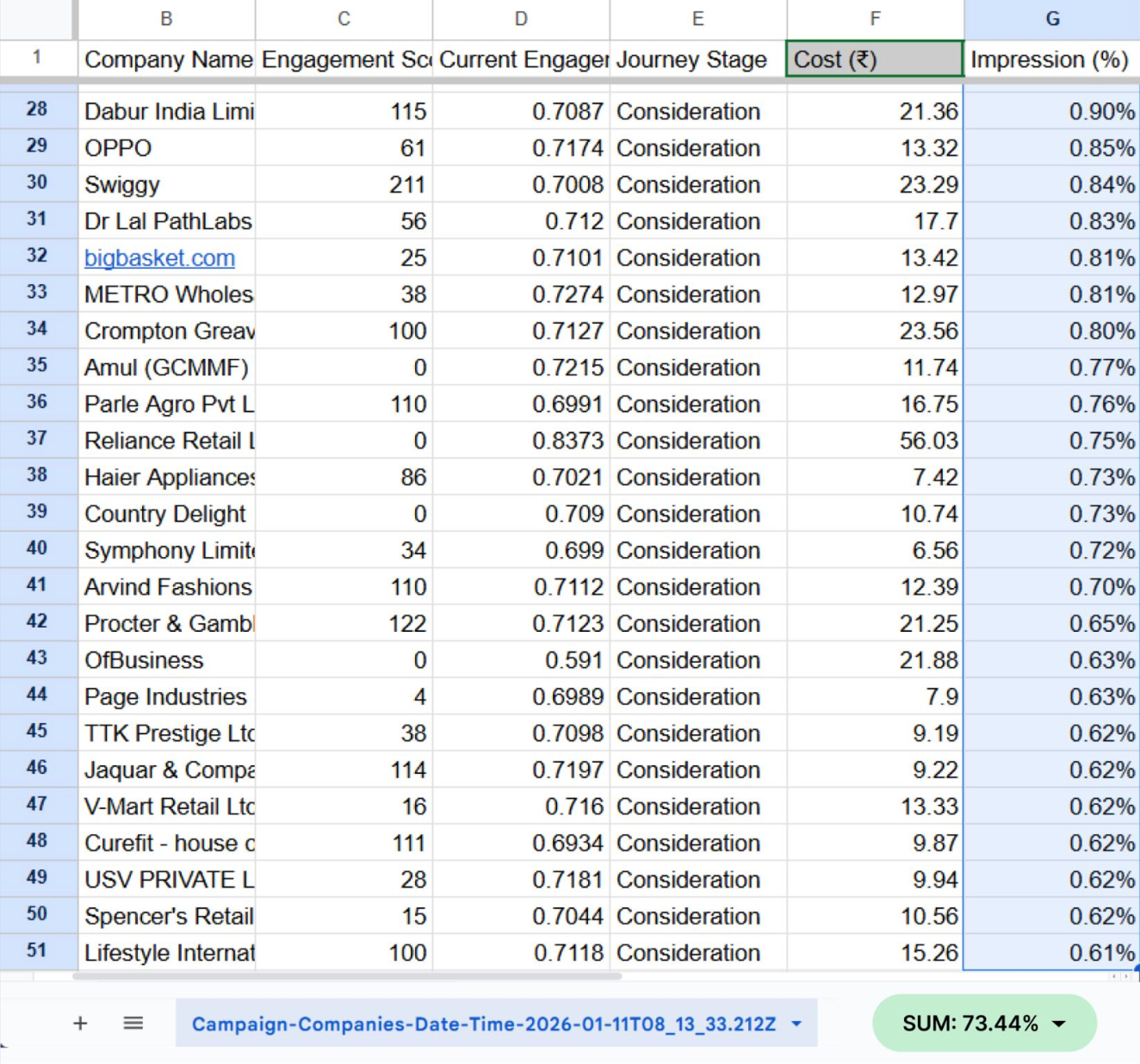
Refer image of a campaign where the Target Account list had 940 accounts. Top 50 accounts (just ~5%) consumed 73.4% of total impressions
50-60% of target accounts receive fewer than 3 impressions per day
Single large accounts consume 20-40% of monthly budgets
Strategic high-value accounts often get zero exposure
You're not running account-based marketing. You're running engagement-based advertising with an account list attached. A key driver of your ABM campaign success is account penetration.
What Is Account Penetration?
LinkedIn reports "reach" at the audience level, i.e., how many individual users saw your ads. If 5,000 people across 500 companies saw your ads, LinkedIn shows 5,000 reach. Looks great in reports.
But if those 5,000 impressions are concentrated on just 50 large companies, your account penetration is only 10%. The other 450 strategic accounts never entered the auction.
Account penetration formula: (Accounts with 3+ impressions / Total target accounts) × 100
Why 3+ impressions matter: LinkedIn filters out granular data and only shows results above 3+ impressions. Measuring impressions lower than 3 is not possible; LinkedIn marketers use that as a standard.
The buying committee problem: B2B purchases involve 6-10 stakeholders per account. When LinkedIn concentrates impressions on a few accounts, you might reach multiple people at those companies. But at the 450 accounts getting zero exposure, you're completely absent from buying committee discussions.
LinkedIn’s Title accuracy makes this worse: LinkedIn's job title data is only 30% accurate. When you layer precise title targeting (VP Marketing, Director of Demand Gen) on your account list, you exclude 70% of the actual buying committee due to title variations and inflation. Your ads might reach the CMO 40 times while missing the Marketing Ops Manager, Demand Gen Director, and RevOps Lead entirely.
Minimum viable frequency by stage for account-level targeting:
Awareness: 30-40 impressions/month per buying committee member (enter memory)
Practitioners report accounts seeing the same ad 40+ times per month actively resent the brand rather than converting. Which brings us back to the good old practice of serving at least 3-5 ad variations per campaign to decrease ad fatigue.
How Account-Level Impression Capping Works
Account-level impression capping sets maximum impressions per company per time period (typically monthly). When a target account hits its cap, LinkedIn's auction automatically stops serving ads to anyone at that company and reallocates budget to accounts that haven't reached their limits.
Example without capping:
Target list: 500 accounts
Monthly budget: $20,000
Result: 50 highly engaged accounts get 500 impressions each (25,000 total impressions), 450 accounts get fewer than 20 impressions, budget is exhausted on 10% of the list
Same campaign with 200-impression cap:
First 50 accounts hit their 200-impression limit in week 1
Budget automatically flows to the next 450 accounts
By month-end: 380+ accounts reached at target frequency
Penetration: 84% vs 10%
The budget doesn't sit idle when accounts hit caps. The auction continuously redistributes spend to available accounts. This creates a predictable, even distribution aligned with your strategic priorities rather than LinkedIn's engagement algorithms.
Different accounts need different exposure based on strategic value, firmographics, and buying complexity. Platforms that support account-level capping allow setting different limits by:
ICP tier: Tier 1 accounts get 300 impressions, Tier 3 accounts get around 150 impressions
Employee count: 5,000+ employee companies get higher caps (more stakeholders)
Industry: Regulated industries (healthcare, financial) need more touches due to longer cycles
Geography: Strategic expansion markets get higher investment
Impression vs click-based caps:
Most platforms offering account-level controls let you cap by impressions OR clicks:
Impression caps: Control visibility regardless of engagement (awareness campaigns)
Click caps: Stop spending on accounts that view but never engage (efficiency focus)
Click-based caps prevent budget wastage on accounts consuming impressions without showing interest signals. When an account hits its click limit, the budget reallocates to accounts actually engaging.
LinkedIn Native vs Account-Level Capping
LinkedIn Campaign Manager offers frequency capping, but it operates at the individual user level. You can set "maximum 2 impressions per person per day." This prevents individual ad fatigue but provides zero control over account-level budget distribution.
Why individual frequency caps don't prevent budget wastage:
Enterprise account example:
Company: Global software firm, 12,000 employees
Individual frequency cap: 2 impressions/person/week
Potential result: 12,000 × 2 = 24,000 impressions per week to one account
Budget impact: This single account consumes 40-50% of the monthly budget, even with individual caps in place
LinkedIn's native controls optimize for user experience (preventing individual annoyance) but ignore account-level strategy. For ABM campaigns with defined target lists, you need company-level controls.
Account-level capping solves this:
Same enterprise with account-level cap:
Company: 12,000 employees
Account cap: 5000 impressions/month total (based on how large the buying committee is)
Result: Your largest target account consumes proportionate budget but not excess
Budget impact: Account consumes an appropriate share, excess flows to other targets
This enables true buying group reach. Instead of 24000 impressions to the most engaged account, you deliver proportionate impressions to reach across the buying committee.
How Recotap Prevents Budget Wastage
While enterprise ABM platforms offer account-level frequency controls as part of multi-channel advertising suites (typically requiring $50K+ annual spend and running display, CTV, social across DSPs), Recotap provides firmographic-based impression capping specifically built for LinkedIn ABM.
Key differentiators:
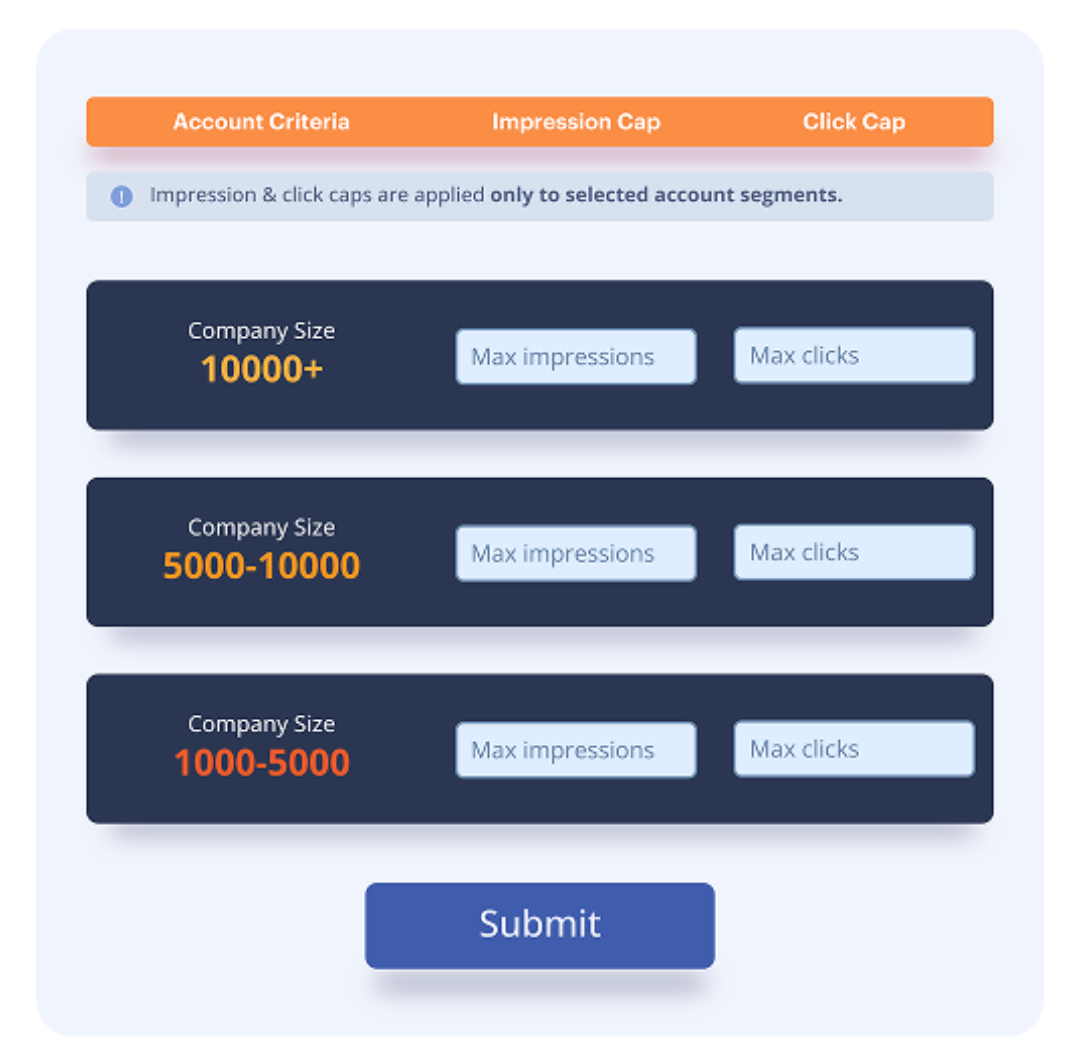
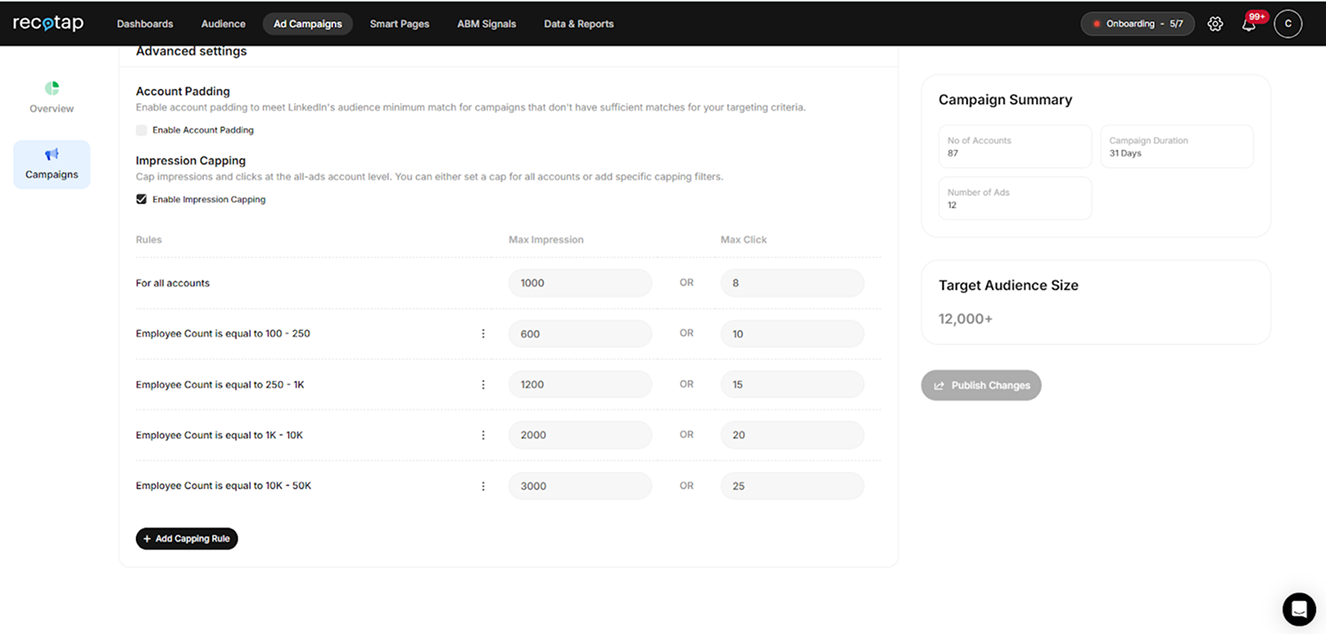
Firmographic capping rules: Set different impression or click limits based on ICP tier, industry, revenue, employee count, and HQ location.
A 100-person startup and a 10,000-person enterprise shouldn't consume equal budgets; that’s why Recotap's rules enforce strategic allocation.
You can refer to the budget allocation as an example above.
The bottom line is that there is no absolute rule for how many impressions you should work with for every company size. Depending on the category, sales cycle, and your own brand maturity stage, you will need to find the optimal impression capping benchmark.
Campaign-level visibility: Unlike LinkedIn's native "Companies" tab (which shows account engagement rolled up at the ad account level), Recotap provides campaign-specific data. You can see exactly which accounts engaged with which campaigns, enabling proper intent mapping and attribution.
Impression + click options: Cap based on impressions (control visibility) or clicks (action taken). Click-based caps automatically reallocate budgets when accounts click exceeding your max clicks rate.
Buying group approach: Instead of layering restrictive job title filters (30% accuracy) that exclude most buying committee members, Recotap's account-level controls work at the firmographic layer (90%+ accuracy) and let ads reach all relevant stakeholders within capped companies.
Set Limits: Define max impressions OR max clicks per account
Layer multiple rules: Create tiered capping (enterprise accounts get 2000 impressions, SMB get 500)
Example rule:
Criteria: Employee Count = 25-100, Industry = Technology
Limit: Max Impressions = 500 per month
When accounts hit their caps, Recotap automatically excludes them from further spending and redistributes budget to under-reached accounts showing intent signals.
Implementation Guide
Step 1: Audit Current Budget Wastage
Export account-level data from LinkedIn Campaign Manager (Plan > Companies section) for the past 30-60 days:
Calculate penetration: (Accounts with 3+ impressions / Total accounts) × 100. Below 50% = severe wastage.
Find concentration: Sort by impression count. If the top 10% of accounts consumed 60%+ of spend, you have concentration.
Count zero-impression accounts: How many target accounts got 0-2 impressions? These represent pure waste.
Max impressions: 5000/month OR max clicks: 50/month
Rationale: Primary target segment
SMB awareness (fewer than 500 employees):
Max impressions: 500/month OR max clicks: 10/month
Rationale: Maintain presence without overinvestment
Step 3: Remove Title Restrictions
Since title data is only 30% accurate, remove or broaden job title filters. Let account-level caps control spending at the company level while allowing reach across the full buying group.
Budget distribution: Visualize spend across accounts (goal: relatively flat curve)
Budget exhaustion: All accounts hitting caps early signals need to raise limits or expand list
Frequently Asked Questions
Q: What's the difference between LinkedIn's frequency capping and account-level impression capping?
A: LinkedIn's native frequency capping limits how often individual users see ads ("2 per person per week"). Account-level capping limits total impressions per company regardless of employee count. One enterprise with 10,000 employees can still consume 40% of your budget with individual frequency caps because thousands of employees each hit personal limits. Account-level capping prevents this by capping the company, not individuals.
Q: How do I know if my campaigns are wasting budget?
A: Export LinkedIn's Companies data. If 50%+ of your target accounts have fewer than 3 impressions, or if 10% of accounts consumed 60%+ of spend, you're wasting budget through concentration. Any single account with 50+ impressions, while most have fewer than 5, indicates severe algorithmic concentration.
Q: Won't impression capping reduce my engagement rates?
A: Yes, temporarily. Capping overexposed accounts (which tend to be most engaged) may drop CTR 15-30%. But you'll reach 3-4x more accounts and generate more pipeline from previously untouched accounts. ABM success is measured by account penetration and influenced revenue, not campaign-level CTR.
Q: Should I cap based on impressions or clicks?
A: Use impression caps for awareness campaigns where consistent visibility matters. Use a combination of impression and click caps for consideration/intent campaigns to prevent budget wastage on accounts that view but never engage. Advanced approach: Start with impression caps (5-8) to ensure minimum exposure, then add click caps (2-3) to stop additional spend on non-responsive accounts.
Q: Can I set different caps by company size or industry?
A: Yes, firmographic-based capping allows different limits by ICP tier, industry, revenue, employee count, and location. Enterprise accounts (5,000+ employees) might get 10k impressions/month due to larger buying committees, while SMB accounts (fewer than 500 employees) get 5k impressions/month. Regulated industries may need 100-150 impressions due to longer buying cycles, depending on the size of the target account.
Q: Why does removing job title targeting improve results?
A: LinkedIn's job title data is only 30% accurate. Precise title filters (VP Marketing + Director of Demand Gen) exclude 70% of the actual buying committee due to title variations. Account-level capping controls spend at the firmographic level (90%+ accuracy) while allowing ads to reach all relevant stakeholders at target companies, not just those with matching titles.